
An AI-powered customer support system that turns a website conversation into a connected business process — from understanding a prospect’s needs and recommending a solution to scheduling a consultation, updating the CRM, and notifying the relevant people.
The Business Problem
A consultation request can involve much more than simply finding an open time on a calendar. Someone needs to understand what the prospect is actually trying to solve, determine whether the business can help, suggest an appropriate direction, collect the relevant information, schedule the meeting, record what was discussed, and make sure the team has enough context before the conversation takes place.
When those activities are handled across separate conversations, calendars, CRMs, and email threads, the process becomes fragmented and dependent on someone manually moving information from one system to another.
The opportunity was therefore not simply to automate appointment booking. It was to connect the entire path from initial enquiry to a prepared consultation, while keeping the customer experience conversational and the underlying business records structured.
What I Built
At the center of the system is an n8n-based AI customer support agent that acts as the conversational and orchestration layer. A website visitor can describe a business problem in natural language, answer discovery questions, receive a practical solution direction, and move into consultation scheduling without having to navigate a separate booking process.
The agent is also given business-specific context about M-Automations, so its recommendations are grounded in the services and capabilities of the business rather than coming from a generic chatbot. Through n8n MCP, it can also access relevant workflow and node information when reasoning about possible automation approaches.
Behind the conversation, specialized systems handle memory, historical context, scheduling, CRM records, and communication. This keeps the AI responsible for interpretation and orchestration while the connected systems remain responsible for persistent operational data.
Conversational Discovery
Understands the visitor’s business problem, asks clarifying questions, and gathers enough context to identify an appropriate next step.
Context-Aware Automation Guidance
Uses business-specific context and connected n8n knowledge to identify relevant automation approaches for the problem being discussed.
Consultation Scheduling
Interprets requested dates and times, checks availability, confirms the details, and creates the appointment.
Connected Records & Context
Connects active memory, historical conversation data, CRM records, calendar events, and notifications into the same customer journey.
The Customer Experience
From the visitor’s perspective, the system begins simply: open the website chat and start a conversation. The interface stays lightweight while the discovery, reasoning, scheduling, and business-system coordination happen behind it.
How the System Works
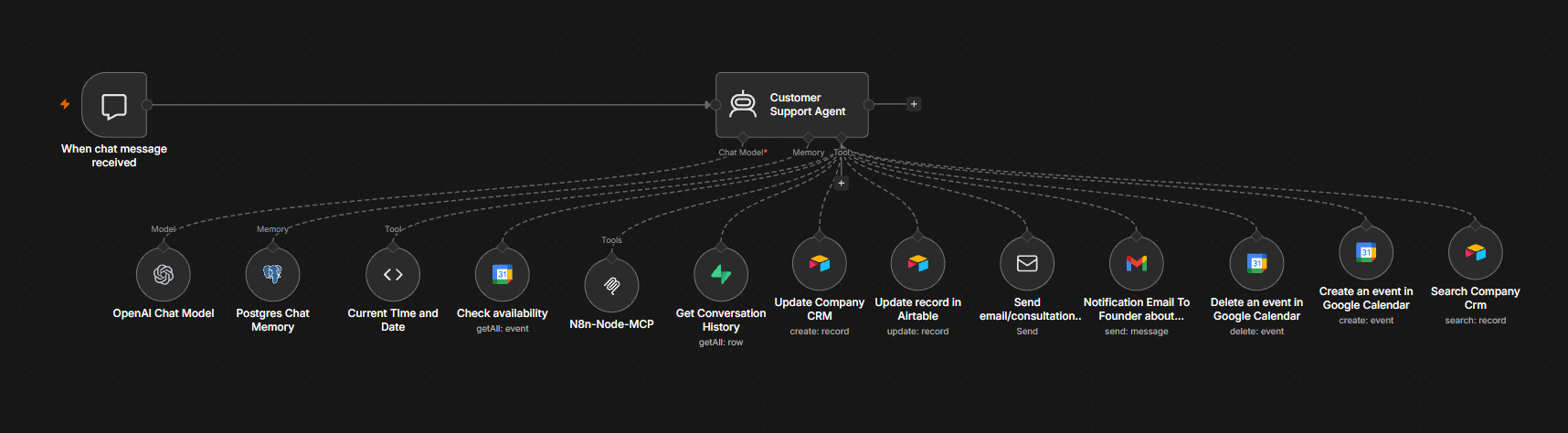
The architecture separates conversational intelligence from the systems responsible for persistent data and operational actions. The AI agent interprets the conversation, determines what information is needed, and selects the appropriate tools, while the connected systems remain responsible for the records and actions they manage.
Visitor
Trigger
Support Agent
Tools
Systems
The agent is powered by OpenAI GPT-5.4-mini and is configured around customer discovery, automation services, solution qualification, consultation booking, business hours, timezone handling, returning customers, appointment changes, CRM requirements, notification requirements, and use of its connected tools.
From Conversation to Business Action
The live demonstration shows the full path from a business problem to a completed operational process. The visitor does not need to understand the systems behind the chat; the workflow coordinates them as the conversation progresses.
The visitor explains what they are trying to improve. In the demonstration, I describe a bakery workflow where I’m using Google Sheets and want to automate order-reminder follow-ups.
The agent uses the business context it has been given together with connected n8n workflow knowledge to identify a practical automation direction for the problem.
Once a consultation is appropriate, the agent collects and confirms the required contact and scheduling details before taking the booking action.
The system checks the requested time against the calendar. Once the slot is confirmed, the appointment is created and the resulting calendar information is captured for the rest of the workflow.
The CRM record stores the customer’s details, booking information, proposed solution, conversation summary, and calendar Event ID so the appointment remains connected to the business record.
The customer receives appointment communication while the founder or relevant team member receives the context needed to prepare for the consultation.
Conversation Memory & Historical Context
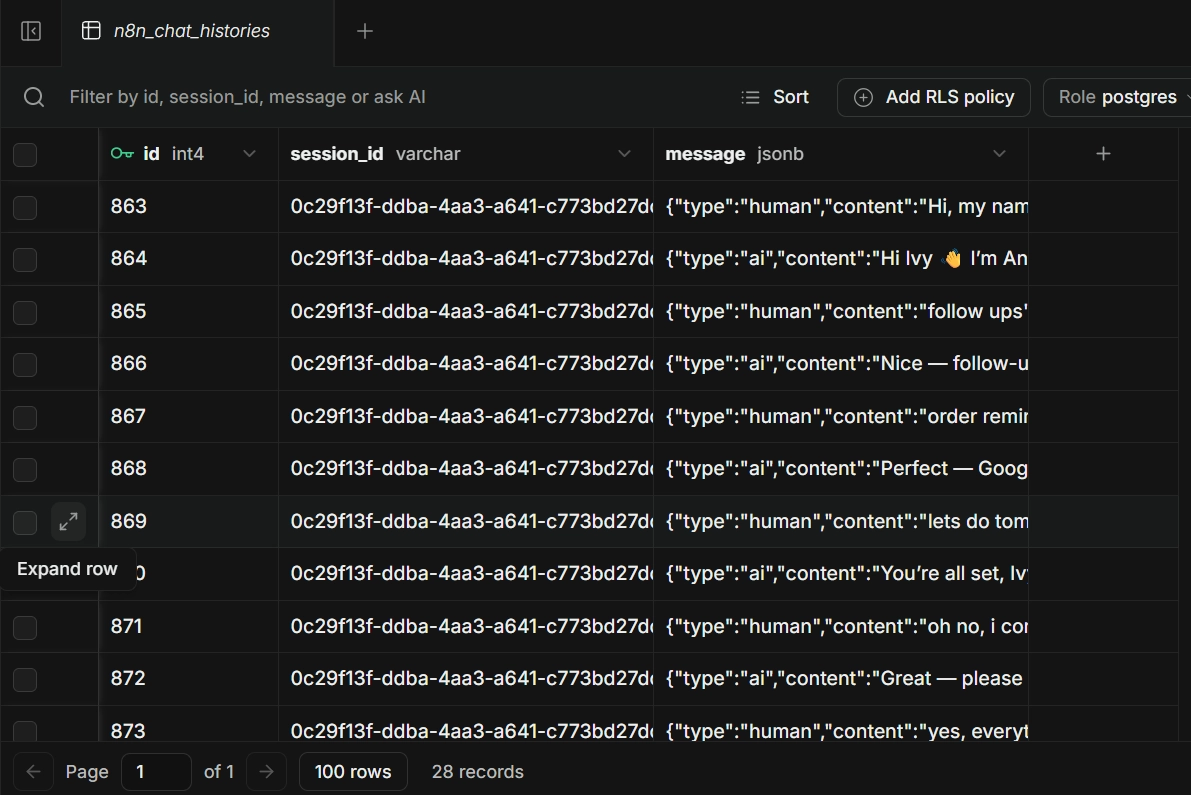
Conversation context is deliberately separated into active memory and historical retrieval. PostgreSQL maintains the active conversation, while Supabase provides searchable access to previous conversation history when additional context is needed.
This keeps conversational history from becoming a substitute for the CRM. Customer records, appointment information, and conversation history remain distinct data layers that can be brought together when the agent needs them.
Beyond the Initial Booking
The workflow was designed around an appointment lifecycle rather than treating a successful booking as the end of the process. The demonstration also tested what happens when the customer needs to change an existing appointment.
In the demonstration, I moved my consultation from 9:00 AM to 11:30 AM. The original calendar event was removed, a replacement event was created, the CRM was updated with the new appointment information, and updated notifications were sent.
The existing CRM record remained the record for that appointment lifecycle rather than creating a second customer record. The calendar Event ID provides the connection between the structured customer record and the operational appointment.
Key Capabilities
Natural-language discovery and clarification around the visitor’s business problem.
Business-specific context and n8n knowledge help the agent identify relevant automation approaches for the problem being discussed.
Active conversation context is maintained separately from searchable historical conversation data.
Date and time requests are interpreted with timezone and business-hour considerations before calendar actions are taken.
Customer and appointment information is stored in Airtable and connected to the calendar through the Event ID.
Existing CRM records and historical conversation data can be retrieved when continuing a customer interaction.
Booking, appointment changes, replacement-event creation, and CRM synchronization are handled as connected operations.
Internal notifications provide customer, appointment, challenge, proposed-solution, and conversation context needed for the consultation.
AI handles interpretation and orchestration while external systems remain responsible for persistent operational data.
The conversation becomes a completed business process.
In the live demonstration, a visitor described a real business problem, received a relevant automation direction, moved into consultation booking, and triggered the connected operational workflow. The system then handled a rescheduling scenario and propagated the change across the calendar, CRM, notifications, and conversation.
Tech Stack
The strongest AI workflows give the model context, then give the systems responsibility.
The core design decision here was to avoid making the AI responsible for everything. The agent handles natural-language understanding, discovery, decision-making, scheduling interpretation, summaries, and tool selection, while calendars, CRM records, conversation history, and communication systems remain responsible for the operational data and actions they manage. Giving the agent business-specific context and relevant workflow knowledge makes its recommendations more useful, while keeping the underlying systems responsible for the actions that actually change the business state.