

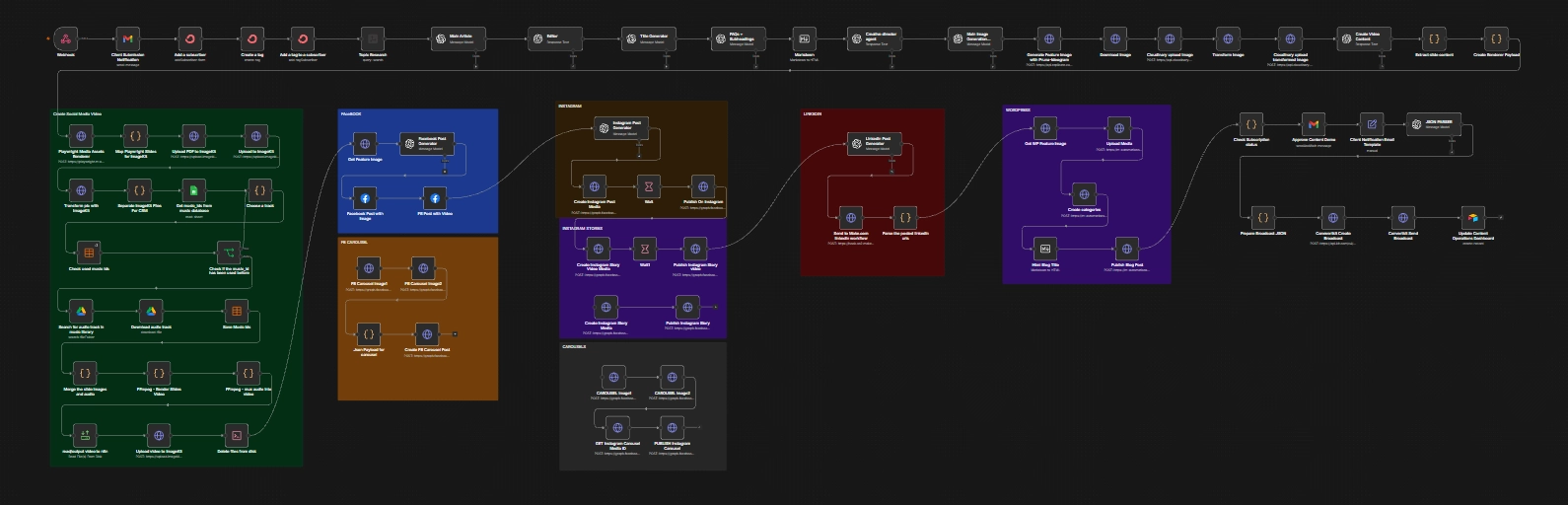
An end-to-end content operations system that takes a client topic from intake through research, editorial production, visual asset creation, short-form video production, multi-channel publishing, post-publication human review, client communication, and operational tracking.
The Business Problem
Turning a client topic into useful, publish-ready content involves far more than generating an article. Research, editorial verification, creative direction, image production, social adaptation, visual rendering, video assembly, publishing, review, client communication, and operational tracking all need to happen in the right order.
When those stages are handled separately, the work becomes fragmented. The same content has to be repeatedly reformatted, assets have to move between tools, publishing activity has to be tracked manually, and it becomes harder to maintain a consistent production process as content operations grow.
I built this system to connect those stages into one coordinated content operation, using AI where interpretation and creative decisions add value while deterministic automation and self-hosted infrastructure handle repeatable processing work.
What I Built
The system starts with a client-facing intake and turns the submitted topic into a coordinated set of editorial, visual, video, and publishing outputs. Instead of treating each channel as a separate production task, the workflow creates shared source material and structured assets that can move through multiple downstream publishing paths.
The architecture deliberately separates research, writing, editorial verification, creative direction, image generation, rendering, video production, publication, communication, and operational tracking so that each stage has a clear responsibility.
Research-Backed Editorial
Uses external research to establish an evidence layer before article generation, followed by a separate editorial verification stage.
Separated Creative Intelligence
Separates creative direction from image-prompt engineering before routing image production through Replicate and the selected image model.
Deterministic Media Pipeline
Uses self-hosted Playwright, Gotenberg, and FFmpeg to turn structured content into consistent branded visual, document, and video assets.
Publishing & Operations
Connects generated content to WordPress and social publishing paths, then carries the completed publication through human review, client communication, ConvertKit, and Airtable operational tracking.
How the System Works
The workflow is designed as a chain of distinct processing stages. The client request enters through n8n, research informs the editorial pipeline, verified content drives creative production, and structured assets then move through deterministic rendering and media-processing infrastructure before reaching publishing, review, communication, and operational tracking.
Request
Orchestration
Editorial
Media
Post-Publication
The AI layer is responsible for research, writing, editorial judgment, creative direction, image-generation orchestration, and platform-specific content decisions. The automation and infrastructure layer is responsible for orchestration, validation, rendering, asset processing, publication, communication, and operational state.
The Rendering Layer I Built
AI can determine what content should say and how information should be structured, but producing reliable branded visual assets is a different problem. I needed the visual presentation layer to be consistent, reusable, and independent from the content-generation logic.
I built a self-hosted Playwright rendering service specifically to handle that responsibility. The workflow sends structured content and presentation data to the renderer, which uses HTML and CSS to compose the branded layouts in a real browser environment and produces reusable visual and document outputs.
Content
Payload
Playwright
& Document Assets
The important architectural decision was to keep the renderer separate from n8n rather than embedding visual composition directly into the content workflow. n8n can therefore remain responsible for orchestration, AI processing, integrations, and business logic, while the rendering service focuses on deterministic browser-based composition and asset generation.
This also makes the renderer reusable. The same service can accept structured content from other automation workflows that need consistent branded visual output, rather than requiring a new design workflow for every content format.
The AI decides what the content should contain; the renderer decides how that structured content should become a consistent visual asset. Branding, typography, layouts, slide roles, and rendering behavior can therefore evolve independently from the content-generation pipeline.
From Client Request to Published Content
The experience for the client is intentionally straightforward. The complexity is handled by the connected production system behind the request, with each stage passing structured information to the next.
The client submits their details and content topic through the customized intake form. n8n receives the request, sends an internal notification, adds the contact to ConvertKit, applies the relevant tag, and triggers the subscription confirmation process. The client is prompted to check their email and confirm their subscription before the later client-facing communication stage.
The customized client-facing form captures the request and immediately initiates the connected lead and subscription lifecycle. The demonstrated submission also triggers the client confirmation email, directing the subscriber to check their inbox.
The submitted request enters the automated content operation with the client, business, topic, and subscription context available to downstream stages.
Tavily gathers external source material, OpenAI produces the long-form article, and a separate editorial stage verifies the generated content against the research before publication-ready content continues downstream.
After editorial verification, supporting content such as the title, FAQs, metadata, and HTML structure is prepared. The Creative Director then determines the visual concept, while a separate image-prompt stage translates that direction into a production-ready prompt for image generation.
The generated feature image is processed through Cloudinary for downstream use. Verified article content also feeds the structured five-slide video-content stage, which passes slide data to the self-hosted Playwright renderer. The resulting visual assets and PDF move through ImageKit, while FFmpeg assembles the short-form video with selected audio from the controlled media library.
The completed content and media assets move through their configured publishing paths, including WordPress and the demonstrated social publishing routes. The LinkedIn path uses Make.com as a dedicated publishing boundary between n8n and LinkedIn.
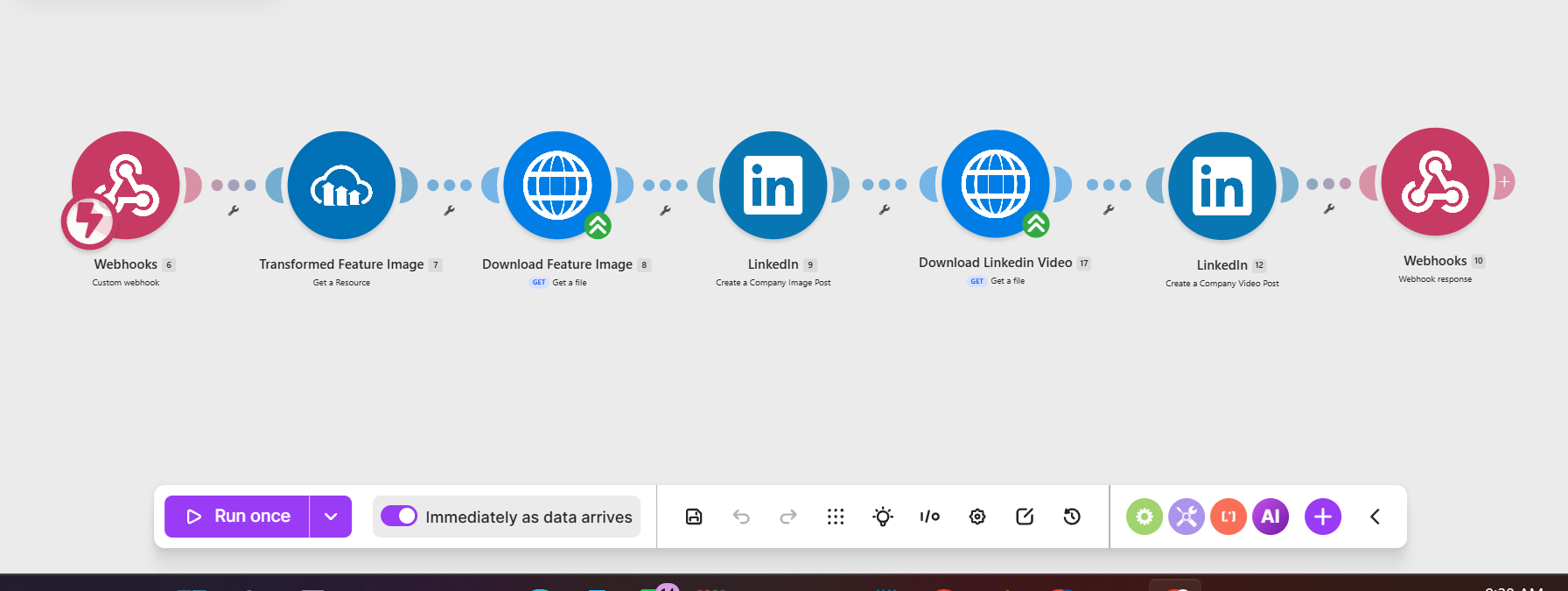
n8n passes the relevant content and media information to Make.com, which handles the LinkedIn publication and returns the published URLs for downstream processing and operational tracking.
After publication, the workflow sends the completed outputs into a human review and approval stage. Gmail provides the branded review interface, allowing the designated reviewer to check the published content and social outputs for accuracy, branding, and quality before the client-facing communication continues.
The review occurs after publication and acts as a post-publication quality-control and communication gate before the client-facing notification is sent.
Once the review and approval stage is complete, the workflow prepares the client-facing communication. Gmail sends the client notification with the relevant publication information, while ConvertKit handles the subscriber-facing broadcast. The resulting content and operational details are then captured in Airtable.
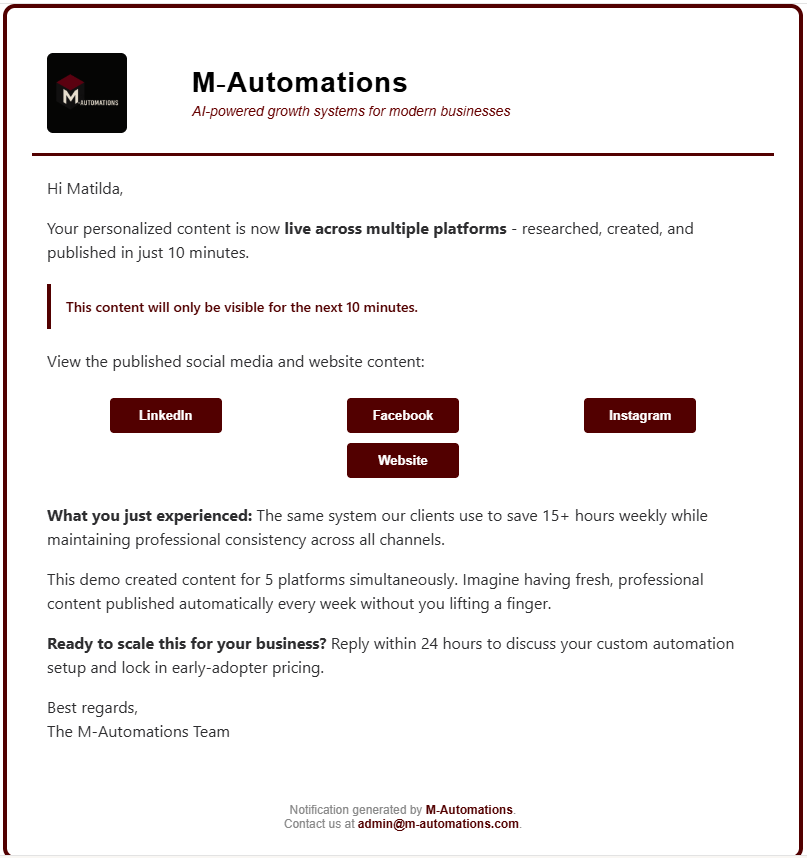
The completed workflow sends the client a branded notification confirming that their content is live and providing the relevant publication information.
Key Capabilities
External research creates an evidence layer before long-form content generation.
Generated content is checked against the research rather than treating generation as the final quality-control step.
Visual concept selection and image-prompt engineering are handled as distinct AI stages.
Structured content is converted into consistent branded assets through the self-hosted Playwright renderer.
Five-slide structured content is rendered and assembled into a finished short-form video with FFmpeg and selected audio.
Shared content outputs feed WordPress and the configured social publishing paths, including the demonstrated LinkedIn route.
Human review occurs after publication and before client-facing communication, providing a controlled quality-control checkpoint.
Airtable captures client, content, asset, publication, notification, subscription, and workflow information for the completed job.
One client request becomes a complete content operation.
In the demonstrated run, a client submission moved through intake and subscription handling, research, article generation, editorial verification, content structuring, creative direction, feature-image generation, social content creation, five-slide video production, deterministic rendering, asset management, and video assembly. The resulting content then moved through the configured publishing paths, followed by post-publication human review, client communication, ConvertKit broadcast activity, and the final Airtable operational record.
Tech Stack
AI should make the content decisions; automation infrastructure should make those decisions repeatable.
That separation is the central engineering idea behind this system. AI handles research, reasoning, writing, editorial judgment, creative direction, image-generation orchestration, and platform-specific content decisions, while self-hosted n8n and supporting infrastructure handle orchestration, validation, rendering, media processing, publication, communication, and operational state.
Building the Playwright renderer made that principle concrete: rather than asking an AI model to produce finished visual assets directly, I created a reusable deterministic rendering layer that accepts structured content and turns it into consistent branded outputs. Keeping that layer separate means the content logic can evolve independently from the visual infrastructure, while the renderer itself can be reused by other automation workflows.