
An AI voice appointment-setting system that turns a natural-language conversation into a structured booking request, checks calendar availability, creates the appointment, updates the CRM, and sends coordinated customer and internal notifications across email and WhatsApp.
The Business Problem
Appointment booking can look simple from the customer’s perspective, but the underlying process often involves several separate systems. A business may need to collect contact information, understand why the person wants to meet, interpret the requested date and time, verify availability, create the appointment, record the booking, and notify the relevant people.
When those steps are handled manually, information can become fragmented between conversations, calendars, CRM records, email, and messaging platforms. The person handling the booking also has to repeat the same administrative work for every appointment.
I built this system to connect the conversational experience to the operational systems that actually execute the booking. The voice assistant handles the natural-language interaction and structured information capture, while Make.com coordinates the downstream business process.
What I Built
The system uses Vapi as the conversational interface and Make.com as the automation and integration layer. The assistant is configured around the Virtual-A-Challenge 30-Day VA Growth Challenge and is designed to answer questions about the challenge while facilitating one-on-one appointment requests.
During the booking conversation, the assistant collects the information required by the downstream workflow, including the customer’s name, email address, phone number, requested date and time, timezone, and meeting purpose. A dedicated Vapi tool provides the structured booking interface, and the assistant’s end-of-call report sends the resulting data into Make.com through a webhook.
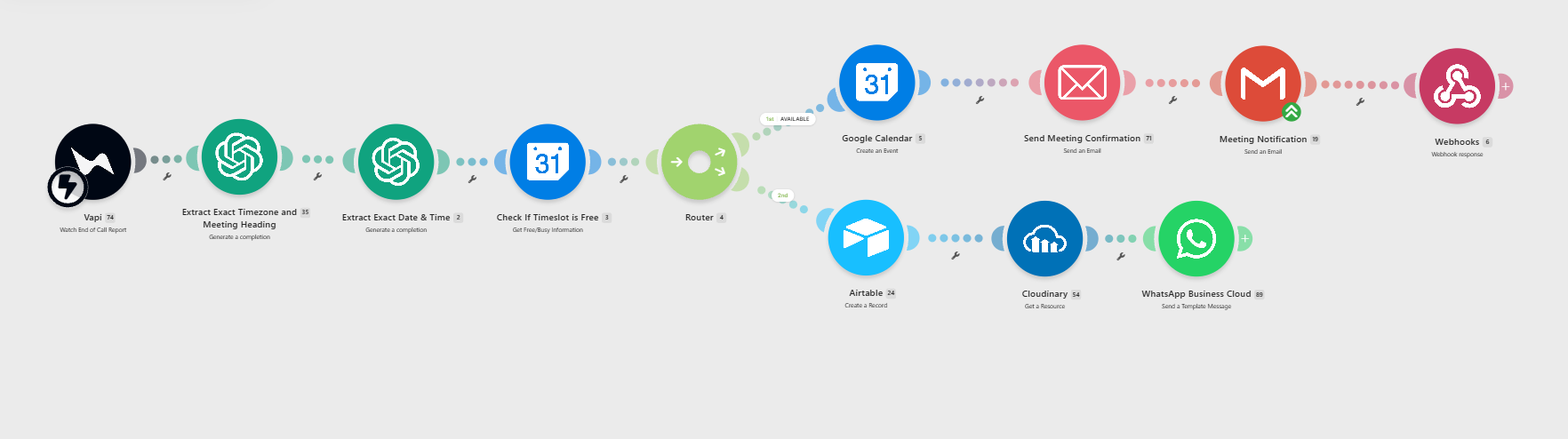
From there, the workflow uses AI for focused interpretation and normalization, checks Google Calendar availability, creates the appointment when the requested slot is available, records the appointment in Airtable, and sends customer and internal notifications through email and WhatsApp.
Conversational Booking
Vapi handles the natural-language interaction and guides the customer through the information required for an appointment.
Structured Data Capture
A dedicated Vapi tool provides the structured booking fields that the downstream automation expects.
Business-System Automation
Make.com coordinates AI processing, calendar availability, appointment creation, CRM updates, and notifications.
Multi-Channel Confirmation
The completed booking generates customer and internal email notifications plus an outbound WhatsApp confirmation.
How the System Works
The architecture separates the part of the process that benefits from conversational AI from the deterministic business operations that should be handled by connected systems.
Voice Call
Assistant
Booking Data
Webhook
Processing
Availability
Event
Notifications
The workflow also returns a response to Vapi after the downstream processing is complete. This closes the loop between the conversational layer and the business systems rather than leaving the voice assistant disconnected from the result of the booking process.
From Conversation to Business Action
The important part of this system is not simply that the assistant can have a conversation. The conversation produces structured information that is then used to perform real business operations.
The customer speaks with the Vapi assistant about the 30-Day VA Growth Challenge and can request a one-on-one consultation with the founder and mentor.
The assistant collects and confirms the customer’s name, email, phone number, requested date, requested time, timezone, and meeting purpose.
The booking information is exposed through the dedicated Vapi tool and passed to Make.com through the Vapi end-of-call report webhook. This creates the structured boundary between the conversation and the automation.
OpenAI processes specific pieces of the structured request, including extracting the timezone, creating a concise professional meeting heading, and normalizing the requested date and time for downstream scheduling.
Google Calendar is queried before an appointment is created. The Make.com routing logic determines whether the requested slot can proceed to appointment creation.
When the slot is available, the calendar appointment is created and the booking is recorded in Airtable with the relevant customer and appointment information.
The workflow sends a customer confirmation email, an internal appointment notification, and an outbound WhatsApp confirmation containing the relevant booking details.
After the downstream workflow processes the booking, a webhook response is returned to Vapi, closing the loop between the conversational assistant and the business automation.
The Voice Assistant
The assistant used for the demonstration is trained around the Virtual-A-Challenge 30-Day VA Growth Challenge. It can provide information about the challenge, answer relevant questions, and transition into the appointment-setting flow when a customer wants a one-on-one consultation.
The demonstration shows the assistant handling the customer conversation before moving into the structured booking process.
Structured Data & the Vapi Tool
A key part of the architecture is the boundary between conversational language and structured automation data. The Vapi tool defines the booking information that the downstream workflow expects, allowing the conversation to produce data that Make.com can reliably process.
The tool is connected to the assistant, while the end-of-call webhook provides the handoff into the Make.com scenario. This keeps the conversational layer responsible for collecting information while the automation layer remains responsible for processing and executing the booking.
The tool demonstration shows the structured booking interface and the webhook connection used to pass the resulting data into the automation.
Key Capabilities
Customers can move from a natural-language conversation into a structured consultation request.
Required booking information is collected and confirmed before the workflow proceeds.
AI handles focused interpretation such as timezone extraction, meeting-heading generation, and date/time normalization.
Google Calendar is checked before an appointment is created.
Appointment information is written to Airtable as part of the booking process.
The customer receives appointment information through email and an outbound WhatsApp confirmation.
The internal team receives the appointment details needed to prepare for the meeting.
The downstream booking result is returned to Vapi rather than leaving the assistant disconnected from the workflow.
Multi-Channel Confirmation
The workflow extends the appointment experience beyond the voice call. Once the appointment is created, the customer receives confirmation through email and an outbound WhatsApp Business Cloud template.
The WhatsApp confirmation includes the customer’s appointment information and uses a branded header asset hosted through Cloudinary. In this demonstration, WhatsApp is used for outbound confirmation; inbound WhatsApp processing is a separate extension rather than part of the current workflow.
The template provides a second customer-facing confirmation channel after the appointment workflow completes.
One voice conversation became a completed appointment workflow.
In the demonstrated run, the assistant collected and confirmed the customer’s booking information, the Vapi end-of-call report reached Make.com, the workflow processed the request, Google Calendar created the appointment, Airtable recorded the booking, and customer and internal notifications were generated. The customer also received an outbound WhatsApp confirmation.
Tech Stack
The value of a voice agent increases when the conversation can trigger real business operations.
The important engineering work in this system is not simply making a voice assistant speak naturally. The conversation has to produce structured information that can cross a reliable boundary into the automation layer. From there, deterministic systems handle the calendar, CRM, email, and messaging operations. The resulting architecture separates conversational interpretation from business-system execution while still allowing the two layers to operate as one end-to-end process.
Possible Extensions
The current implementation establishes the core conversational appointment-setting architecture. Because the assistant, structured data interface, automation layer, calendar, CRM, and communication channels are separated, the system can be extended without changing the fundamental architecture.
- Appointment rescheduling and cancellation
- Alternative-slot negotiation when a requested time is unavailable
- Persistent customer memory
- More advanced CRM workflows and customer qualification
- Conversation and transcript logging
- Human escalation for questions outside the assistant’s scope
- Human approval before selected appointments are confirmed
- Company knowledge-base or database retrieval for more grounded customer support
- Inbound WhatsApp processing and two-way appointment interaction
- Additional post-call workflows driven by the conversation transcript
- Production monitoring, retry handling, and duplicate-booking protection